
Henrique Costa
Be seen as an advocate
How to keep the community informed about your activities
Comparison of tools to manage small ads and keep your users informed (and happy).
I have already reported here my search for a bulletin board for the blog. In the end, I ended up realizing that I also needed a way to interact with my communities, so it was desirable to give users a voice. Thus, I needed the famous forum, which is why I ended up choosing the Gitter .
 Henrique Costa
However, there is a similar demand, boiled down to the need for disclosure without public interaction with users. I would name such use "microblog", if it did not already belong to another type of tool. This is what is known, in the developer world, as "changelog". Let's see what are the main tools in this market.
Or Headway It is a very simple changelog tool, which perfectly meets the demand for spreading news about your product (or whatever you most want to promote). The app provides options for Publish the changelog to a standalone page or directly to a widget , displayed within your blog or app.
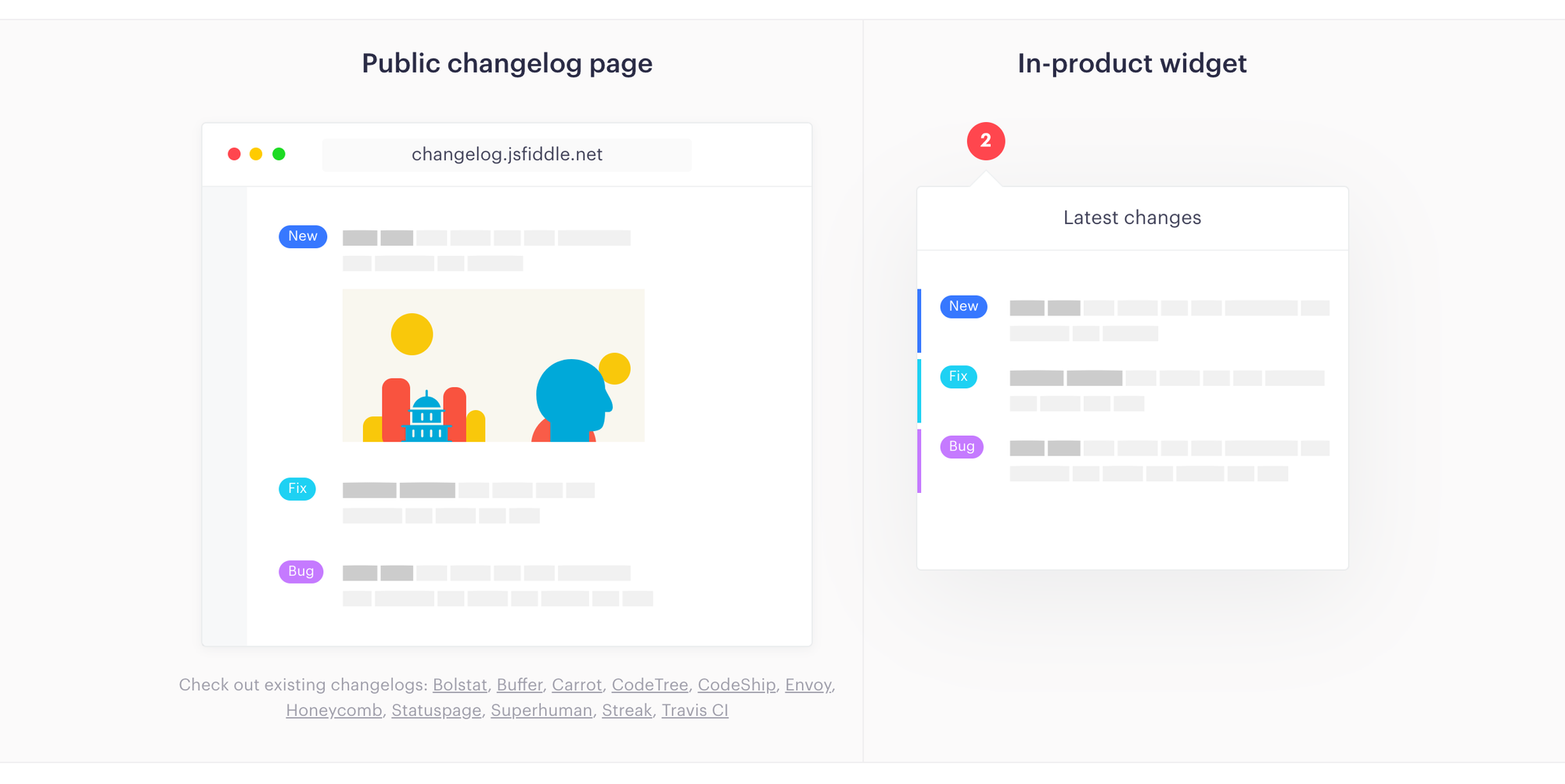
It's what I would call a "root experience" For two reasons: the post is written in markdown and the customization of the widget is limited. The paid plan (USD 29/month) also offers: whitelabel, publication on your domain, integrations, among other features. So, overall, the free plan is more than enough to fulfill the mission of publicizing your activities.
A good alternative to Headway is Announcekit , which has many more customizations in the widget, in addition to being aimed at a wider audience. While changelog tools are originally geared toward developers, there are adaptations to serve marketing and product teams.
This is precisely the case with Announcekit, that included feedback and email notification functionalities in its solution . In terms of price, Annoucekit has a similar plan to Headway for a better price ($19/month). But to use the marketing tools, you need to choose a more expensive plan (starting at USD 49/month). That is, it is cheap for developers and expensive for marketers.
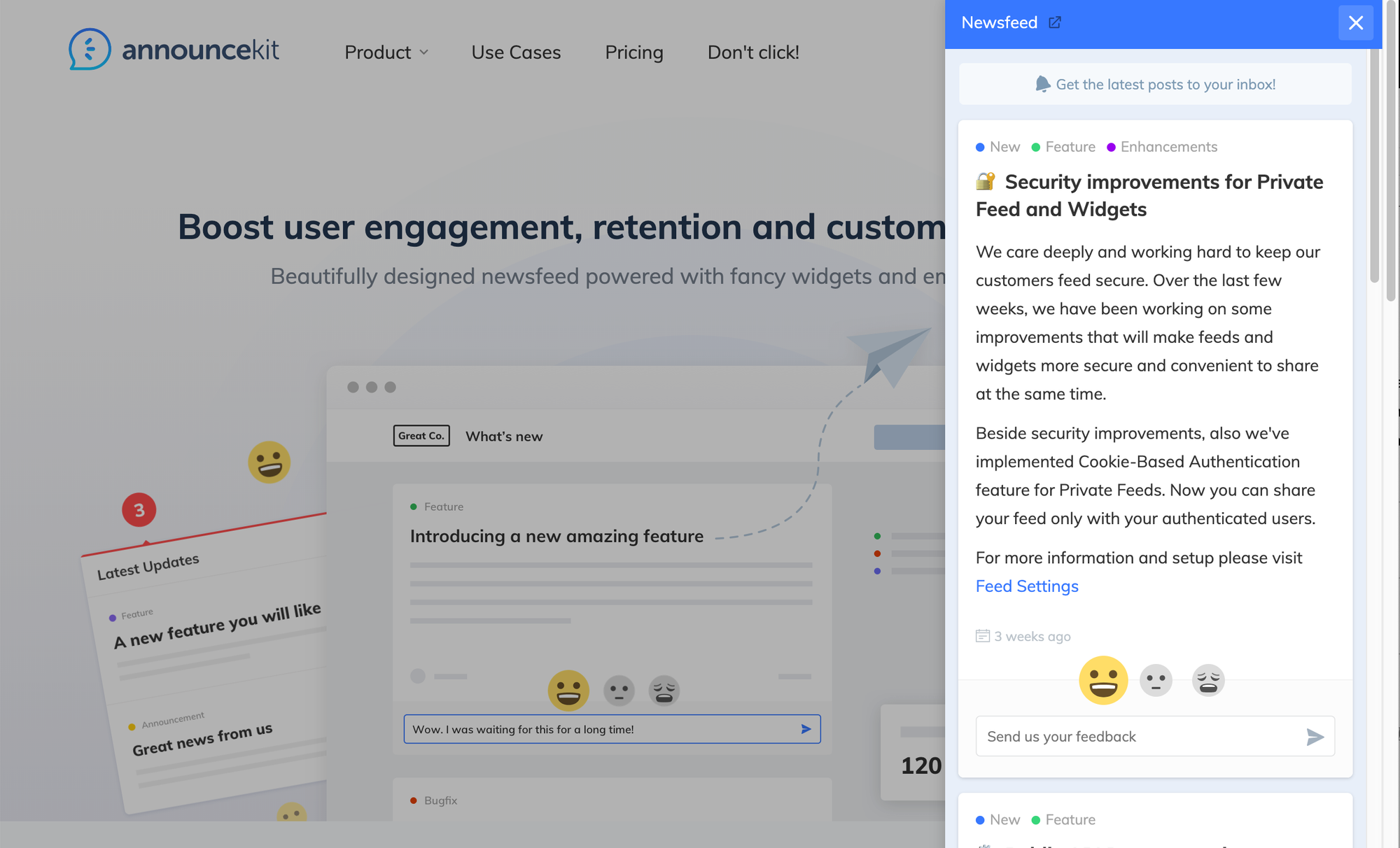
From what I could see, Announcekit is competing directly with Beamer . The biggest difference I found was that Beamer doesn't offer an affordable starter plan, but only charges in the most expensive ranges, with features very similar to those of Announcekit. In fact, even visually the competitors are very similar.

Another competitor to be mentioned is the Noticeable . Since it seems to be the only one that limits the free plan to one project, I haven't delved into the tool. Finally, there is the ReleaseNotes , which has a business model based on the number of subscribers to your changelog. Since it starts at $14/month, I also didn't thoroughly evaluate the app.
That is Competition has organized itself into an increasing line of complexity and price , in the following order: changelog, announcements (releases and announcements in general), notification center, user segmentation, feedback, push notifications, design customization, and integrations with marketing tools.
Personally, I think that if you don't need anything too complicated, Headway is a good option for small ads . But, if you're looking to expand your fulfillment of marketing demands, Announcekit seems to be the most flexible, as it has the most price ranges and features. That way, you'll only pay for what's important, when and if the need arises.
How to share videos on your blog in an (almost) professional way
Second part of the text on how to capture and share videos on your blog.
In the previous post, I evaluated some options to capture and share videos in a simple way on your blog. You might want to take a look at it before jumping into the current discussion:
Henrique Costa 
Essentially, the options that make video sharing simple are made up of chaining each of the following tasks: Capture, edit, store, and share . The apps I dealt with in the last post are a kind of package of all these functions. However, each task can be handled separately and, as far as storage is concerned, there are several possibilities.
Several services offer cloud space and that is why Each of us already has abundant "disk space", distributed across several accounts . The fact is that today storage is the most abundant and cheapest part, although it is a little more difficult to find an interface with a good experience so that the user can take advantage of what they already have.
Given this, I will not look here for the best storage solution, but the best management experience for it. If you're a Mac user, that's where the Dropshare , which is a small paid app ($25.99). Your goal is to connect the menu bar with your preferred cloud storage account. Simply drag the file to be uploaded to the cloud to the Dropshare shortcut and then copy the generated link in the cloud of your choice.
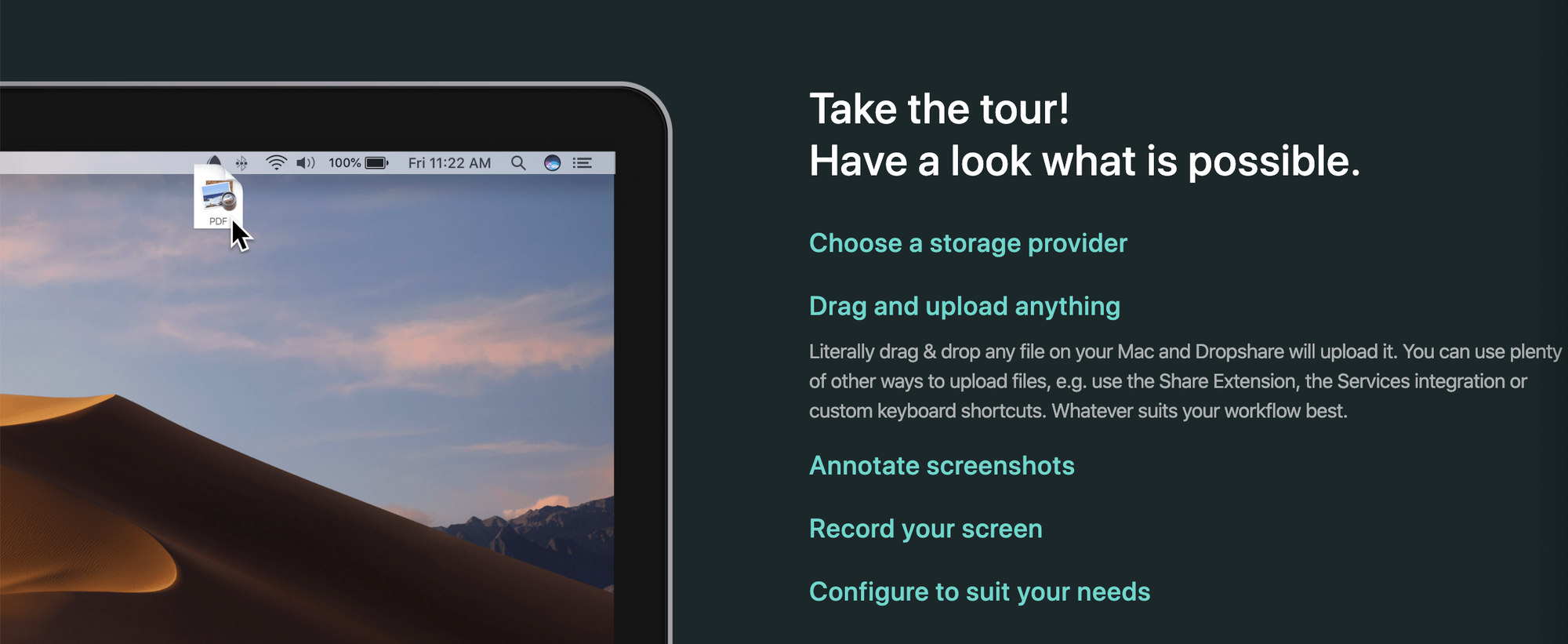
If you prefer to use Dropshare's own cloud, the service offers a free monthly plan of 1 GB of data transfer, limited to storage of 512 MB.
Dropshare is therefore a Cloud space power interface provided by various sources , including the possibility of using Dropshare's own cloud. Generally, the app competes with companies that are in the field of file sharing. But for our use case, what really matters is storage, since the display of the content will happen through the blog - and not, for example, by sending the link by email.

It is true that Dropshare has numerous competitors in the market and the Sweet Setup published a great comparison on the subject. But there is a detail, consistent in that, for the publication of the captured video on the blog, you will need the link to the file, which will end with the extension ".mp4". This is the link to the file displayed in a raw form , fully transparent so that it can be presented as an "embed". It is nothing more than a window, within your blog, through which the user will see the captured file.
Unfortunately, not all providers offer the link in this format and it is essential so that you can display the video directly on your blog without interference. For this you have a few options. If you choose Google Drive, the generated link gives you the option to copy the iframe, which is the line of code to be inserted into the blog. In other words, Google does not prevent the dissemination of files hosted on its network and even facilitates this task, by publishing the code that facilitates integration with the blog (which is precisely the embed).
If you choose Backblaze, in the free plan, the generated link gives you the option to copy the address of the file so that you can prepare the link yourself for insertion in the blog. It is either possible to search for the "direct link" from Dropshare itself, or to open the "standard link" generated by Dropshare . In the latter case, when clicking on the video, the option to copy the address of the file will be displayed, a path that is displayed in the following video:
If you're a Windows user (and don't have Dropshare at your disposal), I imagine that the Cyberduck (R$ 89.90) also solve, as it has a similar proposal for managing cloud space from several providers. To make the experience even more fluid, Mountain Duck (R$ 149.90) offers a number of advantages, at a higher price.
But At this point, we are already moving far away from the problem to be solved , since such tools are actually aimed at a more technical use. For a more detailed comparison of FTP clients, see the blog post BinaryNighsts .
Resuming the thread, we were looking for a customer to easily upload files to the cloud.
We came up with Dropshare as a solution to improve the experience of uploading files to the cloud, leaving the user's choice of their favorite storage service. Then, we considered FTP clients, which are professional solutions precisely for this type of demand. The tendency is for these solutions to be paid.
But, if budget is too tight and you want to forgo some convenience, there are even more sophisticated service providers that don't charge anything to meet the needs of an "average blogger." These are companies whose mission is to distribute content through a complex network of servers, in order to optimize the speed and quality of this delivery.
Here's an example of video served via Cloudinary , in which the sophistication in the treatment of images is demonstrated, which includes transformation, processing, optimization and distribution across a complex network of servers to improve the performance of your application:
A competitor to Cloudinary, also focused on storage, is the Imagekit , whose free plan offers 20 GB of bandwidth per month. This type of company allows itself to offer free plans for data traffic with generous franchises, because the service they provide is not quite that, but a refinement in the way they transform and distribute such data.
In conclusion, it is clear that we are comparing completely different solutions, as the evaluation started with applications that do from capture to hosting, and in the end generic solutions for cloud file management are being compared. They are completely different problems, although the applications mentioned can be used for the same purpose .
I could also conclude in another way: since Loom is exactly what you need to capture and distribute videos in an agile way, they are sure to build a business model that will make you pay for it. If you seek to stay on the sidelines of the business model, using the service for free, you will need to move a little away from the purpose for which the software was developed. The further you go, the cheaper - and more complex - the solution will become.
This seems to be a fairly universal and predictable rule. In my case, I chose to stick with Loom for disposable videos, CloudApp for occasional use (as the free plan is very limited), and Dropshare as the ultimate solution. Anyway For me, the most important thing is a seamless experience when sending files to the cloud , which is precisely the problem that Dropshare sets out to solve.
How to Capture and Share Videos on Your Blog Easily
First part of the text on how to capture and share videos on your blog.
There are several video formats, with different purposes. For my use, I usually share screenshots (screen record), because My goal is to produce demo videos or tutorials . This requires a solution that captures the screen (and sometimes also the webcam), as well as has minimal video editing capabilities. So I mean that if you are looking for a robust video editor, this kind of solution is not suitable.
In addition, when it comes to screen capture, it is very convenient for the application to provide a video hosting and distribution service. It is also desirable, although not essential, that it offers collaboration with your colleagues and work and interaction with the public. And finally, for my need, it is very important that the distribution of the video has a professional look, without too many ads and that it works in harmony with the design of my blog.
As you can see, in the journey of solving this problem, there is a production cycle that goes from capture to sharing. And the type of application we are evaluating is precisely the one that, preferably, covers all these phases. Like this What would be the best way to produce and share this type of video?
For short videos, you can use the free version of the CloudApp . But if your video is longer than 5 minutes, you'll need to subscribe to a paid plan. Ironically, CloudApp's promotional video is not hosted on its servers, but on YouTube. This is a symptom that, although CloudApp serves for content distribution, this is not its primary purpose.
According to CloudApp's proposal, they seek to solve communication problems of designers, developers, executives, marketers, as well as sales and support teams. Your promotional video illustrates this type of use case, demonstrating communication between two people on the same team, discussing a way to enhance the display of a digital photo.
Basically, what the app aims to do is to facilitate visual communication, integrating various media into the communication channels that the team already uses . In other words, CloudApp was not designed to be the "engine room" of your blog, although it has features that allow you to perform this function. The prices and features offered confirm this, as CloudApp seems to have its audience paid precisely in the teams that want to integrate, for greater productivity, the management of the captured content with the sales or support software they already use.
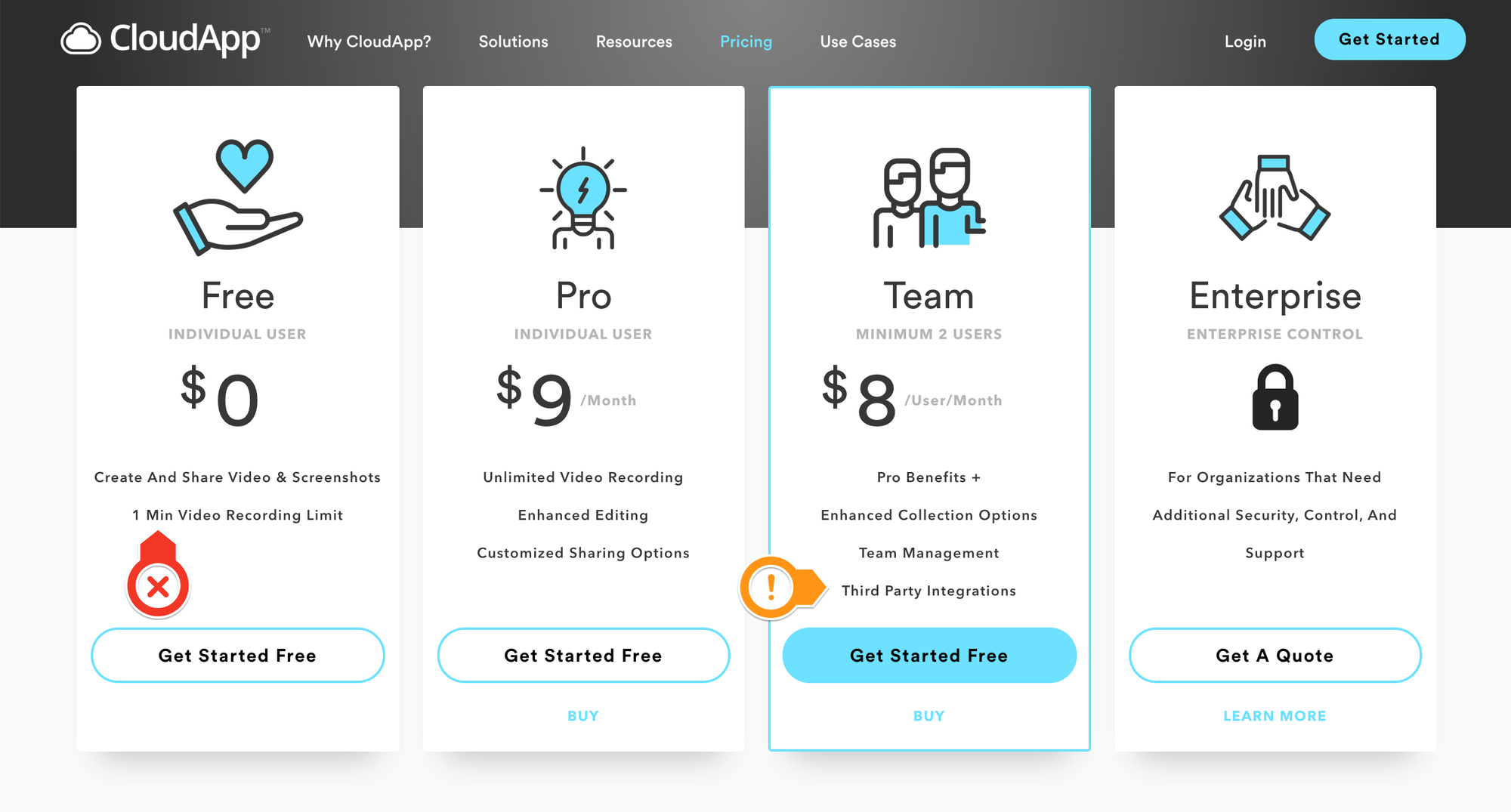
Another advantage of CloudApp is that it allows you to share, in addition to videos, also GIFs and images. It also offers annotations of captures within the application itself, making CloudApp a very complete solution. Another advantage is that, even on the free plan, CloudApp's player is discreet and integrates very well with any blog.
While CloudApp has a complex pricing model based on the length of the videos, the customization of the player so that it becomes fully compatible with your blog, the type of integration available, and the number of captures (up to 25 per month), CloudApp Loom It has a different and simpler approach. While Loom doesn't limit the length of each video on the free plan, it archives your oldest videos, allowing you to only watch the 25 most recent videos.
This coincidence is even curious: while CloudApp only allows 25 new captures per month, Loom only allows access to the 25 most recent captures.
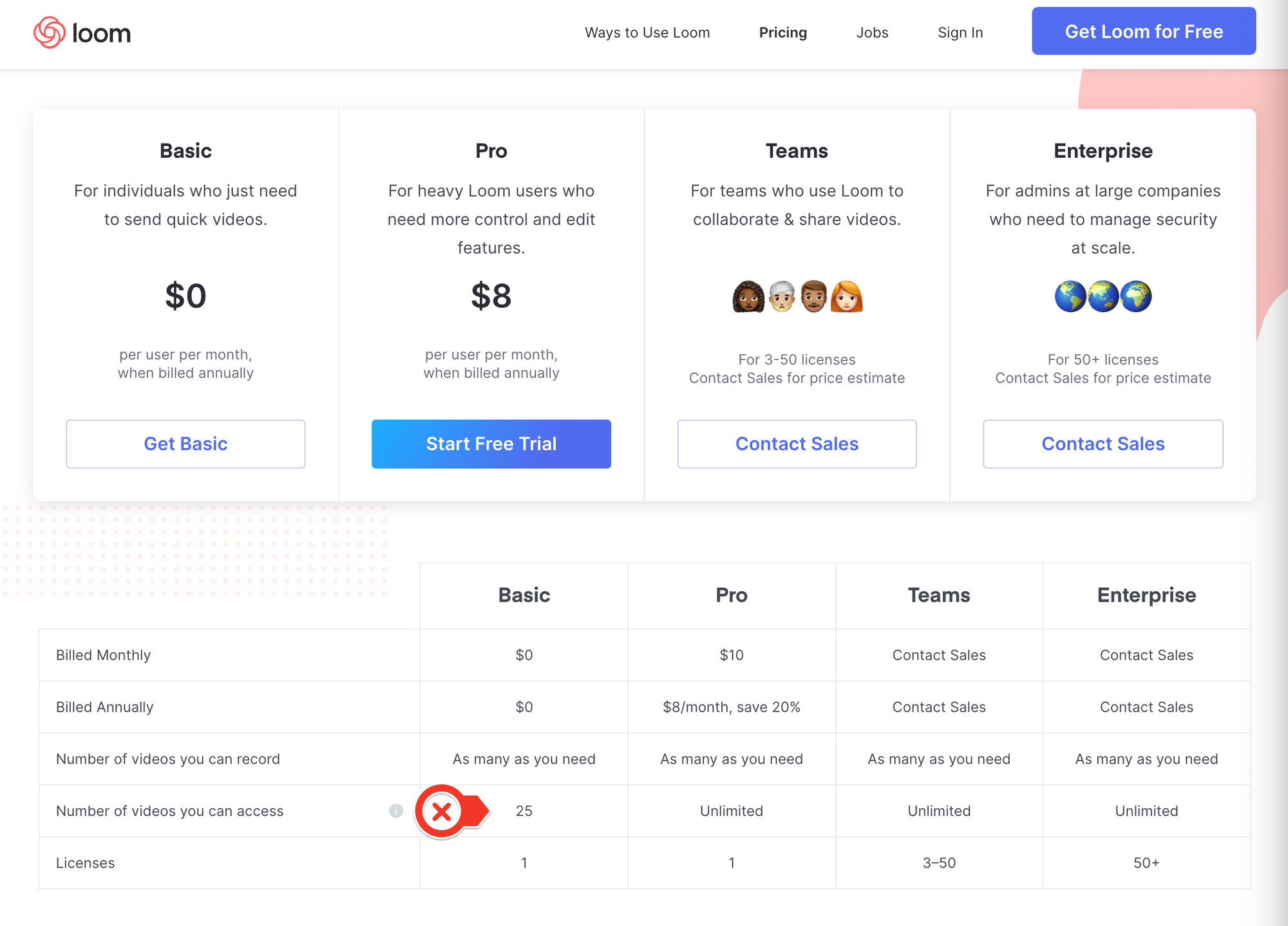
That makes Loom, in my case, an option for disposable videos . Whenever I need to send someone a video that is very fast and doesn't need to be available for a long time, Loom is the first alternative, as this is fully compatible with the one offered in the free plan.
So, if the video needs to be available for a long period of time, I choose to publish it to CloudApp. In fact, the amateur production of Loom's videos itself shows well the company's proposal, which is to make videos with agility, without focusing on refining the production. And here is no criticism, because The company's honest stance for the pursuit of agility, not refinement, is fully compatible with the problem it sets out to solve .
CloudApp and Loom aren't the only options, as you can see in this comparative prepared by the Zapier team. But, even though the comparison is quite complete, I think it is worth adding other possibilities - less obvious - and justify the reasons why they are (or are not) in my preference.
In fact, several people have commented to me that they like the Soapbox , developed by Wistia. One small problem is that Soapbox requires you to appear in the webcam video as well, but we don't always want that. It is true that later you can hide the webcam capture, but You won't be able to easily integrate video into your blog . And for my use, that's a huge problem.
Such limitations make total sense if we evaluate the global strategy of the Wistia , which seems to consider Soapbox as a promotional product. In my view, Soapbox does not exist exactly to generate revenue, but to generate customers for its corporate solutions, which are much more expensive and robust.
Another possibility is to take the screenshot with any software, possibly a free application that already comes on your computer, then distribute the video to the most popular channels: YouTube or Vimeo . In fact, this would even be the expected behavior of someone who has a personal blog. Any solution that deviates from this implies bringing a complexity that the author needs to face.
In my opinion, the recommendations that appear at the end of the video on YouTube and Vimeo induce the audience to leave the blog and compromise the experience as a whole. After all, that's what ads are for. If you want to avoid this noise (which can be represented by a cute puppy as a suggestion at the end of the video 🐶), you can customize the Vimeo player, as long as you are on the paid plan.
If you just want to distribute your video, without any commenting or social media tools, the paid account of the Streamable It's a possibility. The tool is exactly for this and is very easy to use. However, if your account is free, it's good to remember that ads will be posted on your video. Personally, I didn't have a good experience with Streamable, as the video definition was lower than ideal for my case.
This makes me assume that a good part of Streamable's audience is not only people who want to distribute their videos, but who wanted to do so without worrying about the restrictions (e.g., copyright) typical of the big platforms. After all, you don't need to have a Streamable account to post your video, so your post can be anonymous.
Here ends the first part of this evaluation , which will continue soon. In the next step, I will compare the options more focused on cloud file management, which requires the use of at least two applications: one to capture and one to share the captured content.
Henrique Costa 
My list of text editors
List of the text editors I like the most, separated by complexity and price.
Well, before you get to know communities like Research Hacking (organized by Nicholas Cifuentes-Goodbody ), I might even be ashamed of my list of text editors.
But now, meeting a number of people who are several levels above me in terms of organization, I come to open my heart and tell you which text editors I have used. As you can see, there are several. 😇
If you are not familiar with the proposal of editors in markdown, I recommend a short video, in which the aforementioned Cifuentes-Goodbody demonstrates the advantages of this type of writing. I agree with this approach and so whenever I can, I choose to write in markdown.
From the simplest to the most complex, I use as an editor the Sublime , especially when I'm going to edit files in .txt. I know, however, that Sublime has several very advanced features, especially for those who write in computer code.
As my use is limited on this front, I prefer to stick with Sublime just to have one less editor, since my list is large and it is a great option for simple tasks as well. It's a very versatile editor, in which you don't feel the weight of many features , as they are hidden in the interface, which is quite clean.
From a business model perspective, you are not required to pay for Sublime, as there is a free version with an indefinite trial. The program just politely warns you from time to time that, if you want, you can buy a license.
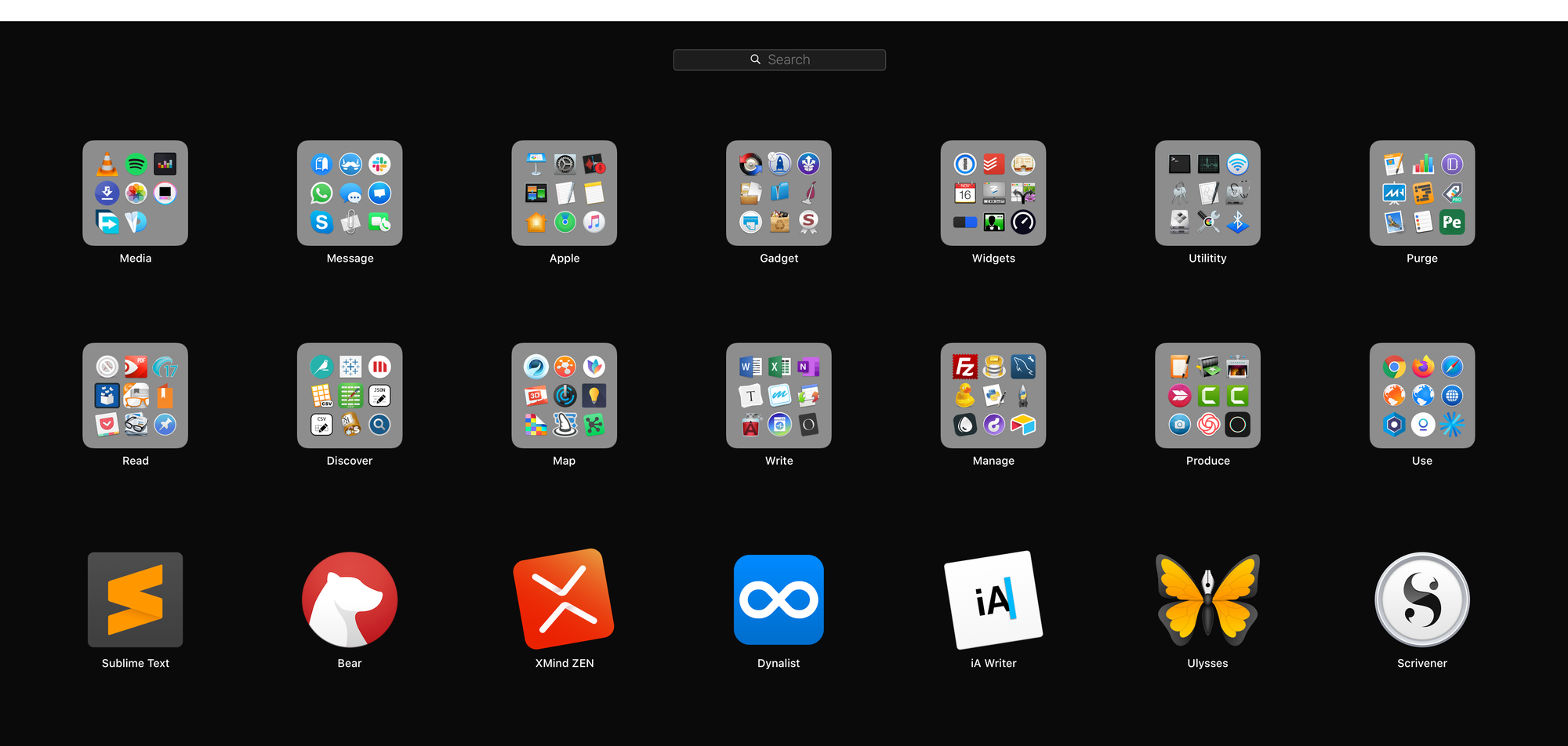
To a slightly more complex degree, I use the Bear . I see Bear as a notes app that has a great information retrieval system , especially through your nested hashtags. That's right: you can create a structured hashtag tree and browse your notes by subject.
I have already explained, in the past, how I organize in Bear the questions I apply in my tests. It really is a very useful application that already has a lot of features in its free version. The main paid feature is the synchronization of notes between different devices, which is something that I personally find dispensable.
Moving on to editors of more structured information, I use the XMind . In fact, it is not a text editor, but mind maps. So it is not exactly possible to compare it with the other editors. Its free version is quite robust and, for my use, it is quite sufficient.
Finally, as for XMind, I don't miss the paid version as its only unique functionality is the mind map exporter in .pdf and image formats. The free version generates the same export files but with a watermark.
In the field of structured text editors, the Dynalist It's my option. It is an outline editor, that is, structured lists . The search tool is amazing and you can see that the app is constantly evolving.
Like the other apps mentioned, Dynalist has a very generous free plan and the only features that seem to be missing are bookmarking and the hashtag panel. This does not hinder the use of the free version, no doubt.
Moving on to longer text editors, I use the iA Writer . It's a very basic markdown editor, but extremely well finished . It is a paid software that is worth every penny, USD 29.90 for the Mac version and USD 19.90 for Windows. If you are interested, the developer has published a Very complete comparison - and partial - considering Word to Microsoft:
As iA Writer is mandatorily paid, I leave you with a free alternative that basically meets the same demand: Typora . By the way, Typora is a very original editor and has great support for tables in markdown. But this subject is so complex that it would require a new post.
The last two editors are also paid and serve for very complex projects, for example, for writing a book.
Still in the field of markdown writing, I use the Ulysses . If you decide to subscribe to Ulysses (that is, the developer no longer works selling licenses), you will have to pay R$ 14.90 per month. Personally, I find the value expensive and I continue to use an old version, which I bought before the subscription model was imposed. Nevertheless no one can fail to recognize the quality of Ulysses .
And, in the field of editors with inline formatting in the text (i.e., rich text format), the editor of my choice is the Scrivener . Its Mac version costs R$ 184, while the Window version costs R$ 169. In my view, because I don't work with markdown, Scriver is the natural evolution for users unhappy with Microsoft's Word .
In conclusion, there are several good solutions on the market, with different purposes and prices. The big question seems to be how much you're willing to invest, in terms of time and money, to avoid using Microsoft's Word. In my case, because I know that the other options are much more mission-oriented tools, I only use Word as a last alternative.
In search of a bulletin board for the blog
Comparison between the main community management and chat applications aimed at the corporate market. The mission is to avoid Whatsapp at all costs.
To improve communication with my students, I always looked for a simple tool. The main goal was to avoid the ubiquitous Whatsapp , as I understand it is important to separate personal and professional communication. Incredible as it may seem, this can currently be considered an ambitious goal.
In addition, he was looking for a form of communication in the style of an open forum, not of private contact with each of the students. What I wanted to do with this was to have a very simple bulletin board, so that I could record where I stopped and what the schedule of the next class would be.
That is, I wanted to create a digital class journal.
I also wanted to make it possible for the public to be accessible, because I know that the need for authentication for reading ends up being a huge barrier. As I already had a blog, I was looking for a more agile communication than a normal post, more along the lines of a chat. Finally, I wanted it to be a free solution.
My option ended up being the Gitter , which is a fairly simple community management platform. While Gitter doesn't define its audience as programmers, it's pretty clear that it's about community management for these professionals. Either way, there's nothing stopping us from taking advantage of the wonderful tools that developers create for you.
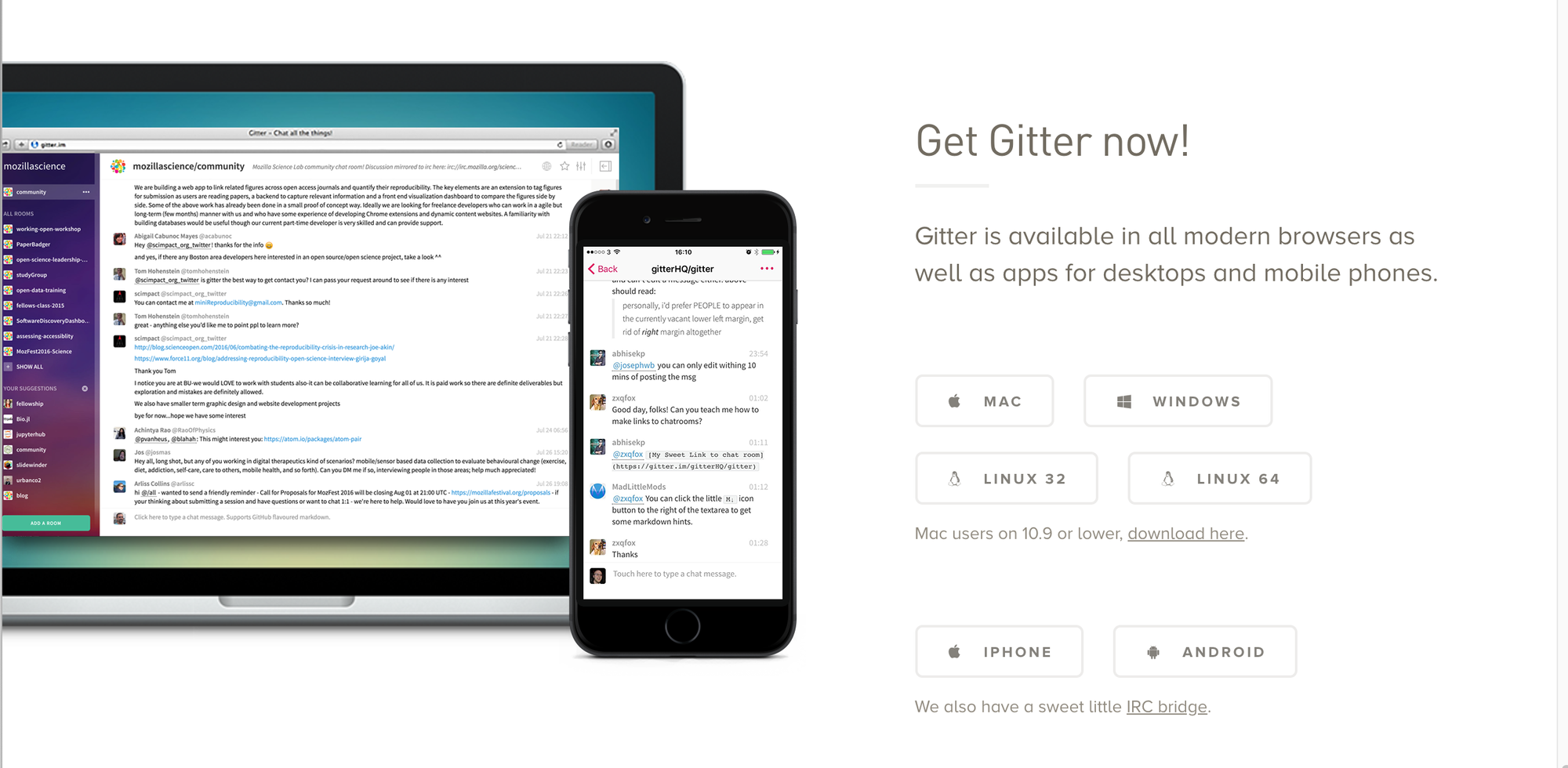
To get an idea of the importance of this platform, Gitter was bought by GitLab in 2017, when it already had more than 800 thousand users. Since then, it has been an open source project and without any limitation of use. This is because Gitter is no longer a company with a commercial purpose and has become GitLab's arm focused on developing communities that strengthen its position in the market (repository management for developers).
But this is not so relevant to us, other than for the fact that everything leads us to believe that Gitter is indeed a solid option and that it will not be discontinued. Speaking of options, some solutions are worth mentioning, if only to clarify how they differ from Gitter .
Among the alternatives is the Slack , a gigantic company, with daily activity of more than 12 million users. It is not, therefore, a niche option, but an alternative to communication for the world of work as a whole. In addition, its mission is internal communication between teams, not community management.
This field of generic solutions for the world of work seems to be quite congested, with multiple - and great - options, which would be a good subject for another post. Here I am restricting myself to comparing solutions to my concrete problem, which is the management of my communities. That is, the management of my classrooms.
Although it has had relative success in communicating with students via Slack and, more recently, via Discord , I ended up deciding to build a lighter and more open forum , which could be presented within the page of each course I teach. I was happy with the result and I hope it works better than my previous attempts, because I ended up realizing that I wasn't using the best tools for the mission.
The icing on the cake is that, precisely because it is a community in the world of technology, the development of Gitter is very agile and focused on integrations in different ways. In this case, I chose to use an integration called Sidecar , which allows you to display Gitter directly on the blog. The result is as follows:
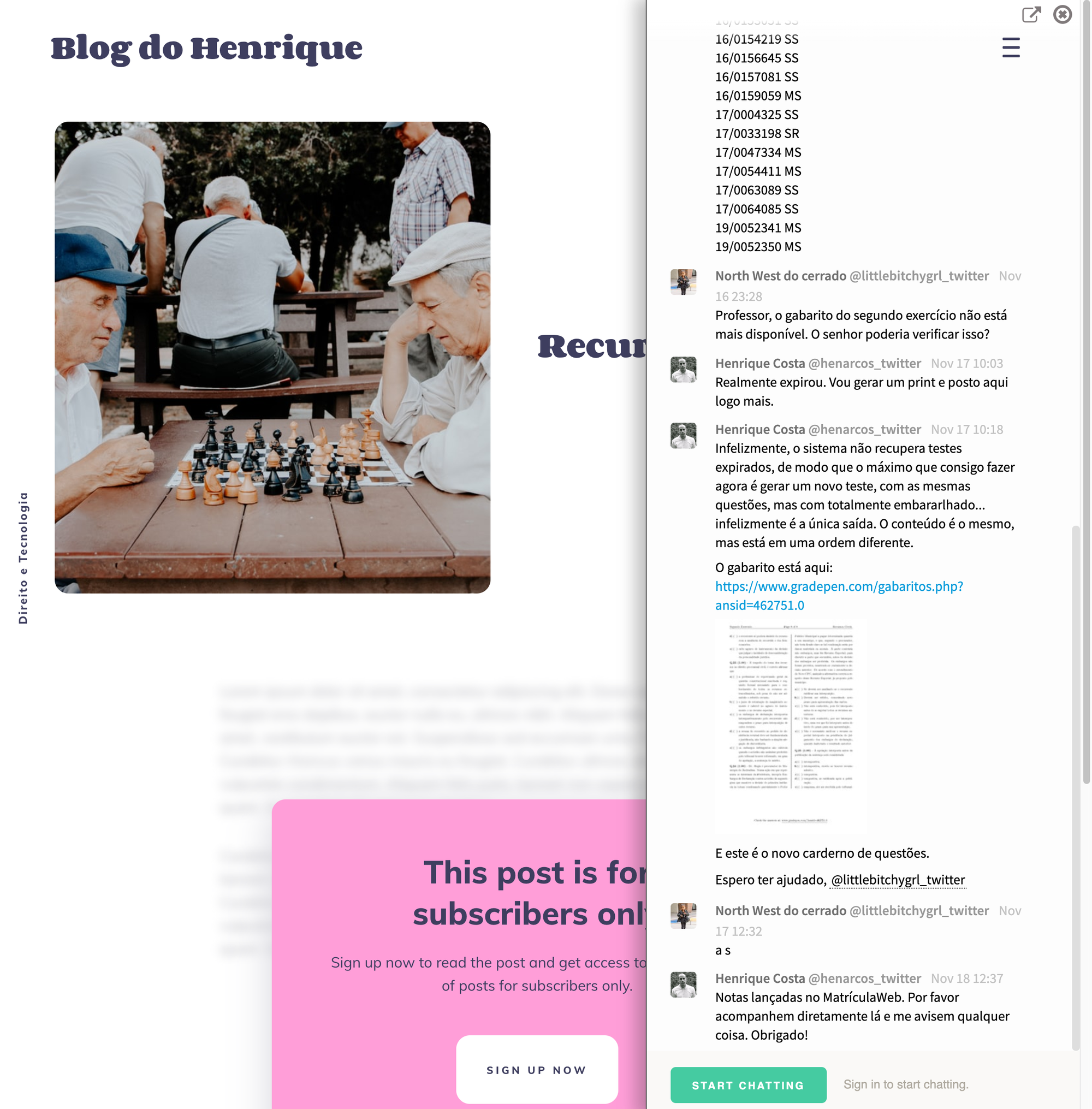
No more Whatsapp, no more Facebook Pages. 😅
In fact, I know that these solutions will continue to exist and that many students will be informed, second-hand, by posts propagated in those communities. The important thing for me is that I will be able to maintain organized and accessible communication, which I was having difficulty accomplishing through more complex tools.
Henrique Costa 
It is quite common to hear teachers saying that the worst part of the profession is correcting tests. But how do they prepare for this activity?
For me there are two alternatives: either you invest time in preparation and then you have a good correction; or you will have a real nightmare during this process.
In recent years, due to the type of discipline I started teaching and also due to the large number of students enrolled in the classes of the Faculty of Law of UnB, I decided to invest in the preparation of objective tests. I really think it was a good decision and that I learned to create tests that evaluate well the progress of each student throughout the course.
I have already published one post previously, explaining how I elaborate and organize the questions. In summary, I use the Bear for this, because it has the best hierarchical tag organization system I know. It is, in fact, a generic note-taking application, currently only available for Mac. If you are a Windows user, you may be able to solve your problem, for example, with OneNote.
Going back to the subject, let's say, for example, that I have prepared a test with objective questions, either in Bear, or in another text editor with less organizational capacity. Still, it would be necessary to edit and print this proof, which would possibly be done in Word.
So far, nothing new. But how could correction be made?
That's where a series of applications come in, whose mission is simply to generate an answer sheet for correcting objective questions through your cell phone. There are several options for this and most of them are free, if you just want to generate the answer sheet.
But that's not enough for me and I'd rather pay (a few cents per race) and have a number of advantages. My choice is the Gradepen , a Brazilian application that also shuffles the questions, generates the test for printing, hosts the answer on the internet and allows its correction by cell phone.
If you prefer another national tool with a more comprehensive purpose, it is worth taking a look at the Easy Proof or in the Quick Proof . I would say that both are more like an assessment automation platform than an exam generator. In other words, they include the possibility of applying tests in electronic media and, in the case of Prova Fácil, the entire management of the application of the test in several rooms.
Without a doubt, Prova Fácil and Prova Rápida are more complete and even cheaper than Gradepen. Nevertheless as I don't need the features offered by them, my choice is for Gradepen . In addition, I like to support independent developers, who develop software for small market solutions.
Among the foreign options, I would consider the QuickKey or ZipGrade or the Gradecam . I would not, however, consider the Lightning Grader Not even the Scantron , as they are much more expensive and compete exclusively in the corporate market. The following video illustrates how one of these options works:
Still as for my option, which is the GradePen, It is necessary to recognize that not everything is rosy . The development of the application has not been showing much breath and the user experience is not the best. The software has a very old-fashioned look. But if you just need to shuffle a few questions and correct everything on your phone, it's much more than enough.
With this strategy, I started to prepare and correct the tests with great agility. In addition, because I started to manage a very large base of questions, I started to have no problem in performing several exercises and allowing students to take the question book home. In other words, the cost of preparing a test has decreased considerably.
Thus, I believe that the planning and execution of evaluations became much more aligned with teaching activities. In this way, the course tends to become more predictable and more dynamic. And I am happier, because I spend my time preparing the questions, not correcting them .
On the other hand, I recognize that some disciplines are incompatible with evaluation by objective questions. But I also think that, with some effort, the teacher can learn to formulate objective questions in a more interesting way, which will reduce this limitation.
Finally, an additional positive point is that, in my case, I started to learn more about the content, which helps me to be a better teacher . In my view, this way of working can inaugurate a virtuous circle. For this it is only necessary that the teacher dedicates himself more to preparing than to correcting the tests, which seems to me to be a much smarter option.
How many tabs are open right now in your browser?
I always take a look at my friends 😬' notebooks to see how many tabs are open in the browser. It is very common for there to be several tabs, each with a working web application.
If you identify with this and are resistant to living in chaos, that's okay . But if you want to have a little more focus and routine in your work, I'll give you some suggestions to overcome the proliferation of tabs in your internet browser.
Toby: the bookmark manager ↑
Free for personal use. Paid for teams.
The first alternative to beat tabs is to use the browser's bookmarks tab. But soon it will be crowded and you will only change problems. As far as I've researched, there isn't a native browser with a good solution for managing bookmarks. That's where the Toby .
The app (actually a Chrome extension) transforms the native behavior of the browser button that, by default, opened a new tab. With Toby installed, this button opens a kind of desktop in the browser, where all your favorites will be. In summary, it is this: Toby turns the bookmarks bar into a bookmarks workspace .
Since Toby isn't a new browser, its experience is more familiar. In addition, precisely because you use the same browser you are already used to, the address bar will always be visible - which can even be a disadvantage. After all, half of the magic of the following apps is precisely in hiding the address bar, reminding us that we are, most of the time, in real apps, and not mere web pages.
I've used the app more, but I still have my bank account shortcuts registered with Toby. It may sound like superstition, but I prefer to keep sensitive sites running natively in Chrome, using Toby as my bookmark manager.
Franz: messaging app ↑
Quite satisfying. Paid version available.
While managing tabs and bookmarks is a generic problem, there may be a specific cause for it. If your proliferation of tabs stems from the management of messaging apps, the Franz is the solution . You'll have all your messaging apps, including email, in one environment, which might solve your situation.
I use Franz at least weekly or when I need to search for an email in one of my Gmail accounts. I also use Franz to check other email accounts, Slack accounts that I follow less often, as well as Discord accounts. In other words, Franz is my go-to solution for messages, especially those that I don't want to receive notifications about right away.
Station: one app for everyone else ↑
Free for personal use. In the future, it will be paid to teams.
While Franz is focused on messaging apps, Station It caters to the most popular applications of all kinds. Station is in full development and recently the functionality that allows the creation of applications that are not yet listed was included.
I always use Station every day and I am very satisfied. It really is a must-have app for me . I wouldn't trade Station for anything.
Manageyum: Paid and Simpler Option ↑
Paid app with trial.
Manageyum it is an option only if you are willing to pay USD 47. But I find this difficult to convince, since the free version of Rambox does practically the same thing, with a little less elegance.
It is worth noting that, while the competition focuses on enabling multiple logins in several simultaneous applications, Manageuym also allows you to run multiple instances of the same application . This seems to be a real differential.
What it seems to me is that, in any case, the price is disproportionate to the product that is supplied. This perception is confirmed by the comments on the Product Hunt page. The same page also reveals that the current version of the software is already two years old, while competitors are moving quite fast, perhaps because they have more funding and staff.
Personally, since I paid for the software, I ended up leaving some very specific applications installed on it, services in which I manage multiple accounts without having to enter the password again at each appointment. I also keep my YouTube there, because curiously, it doesn't work well in the other apps I use. But this certainly does not justify the investment.
Rambox: paid and more robust option ↑
Paid app with a 30-day trial. Free version available, but limited.
Or Rambox It's the most mature option I've come across, as it has almost everything you can dream up for organizing your desktop. But this comes at a price: USD 4/month. Although there is a free version, it doesn't even resemble the paid version. If you don't intend to pay for the app, there's no point in starting to use the free version, as it is incompatible with the paid version. There is no migration between them.
Although it is the most complete application in the category, in my view, it still lacks some features, for example, reordering them in the vertical bar. From what I tested, once you create a group, you have no way to drag to change the order. Also, I didn't find an option to remove an app from the group, as well as make it appear in two groups.
I also noticed that Rambox is very faithful, in an exaggerated way, to the philosophy of the operation of an isolated application, failing to allow the opening of any link as a new tab. I think it's about a flexibility that a paid app (even more so as a subscription) needs to offer. In this regard, Station, which is free, seems to have a much better executed functionality.
I ended up not using Rambox to the point of having a definitive opinion about it, having only performed tests.
Shift: Rambox challenger ↑
Paid app, the most expensive of all. Free version available, but limited.
I still don't have a definitive opinion on the Shift , but it seems to me a more expensive Rambox option. Another impression is that it positions itself as a solution for managing several Gmail accounts, although it is much more than that. In any case, it prioritizes the development of features for Gmail, for example, an integrated search of all your email boxes with one click.
If you subscribe to such a service for $99.99/year, that's okay. For me, unfortunately, it's a problem. There is also a cheaper option, for USD 29.99/year, but it does not have all the features. In the same vein as the limitation of features, the free version is nothing more than a demo, which does not offer any conditions to test the application.
I don't recommend this app, although I recognize its quality. I simply think it's more expensive than it should be .
Firework: clone your launchpad ↑
Paid app. Free version available quite functional.
Firework It's a small launchpad for your web apps, with a pretty satisfying free version. As far as I could tell, the only missing features are: renaming the apps and allowing them to open in a new window. In the free version, Firework limits simultaneous access to two applications, but I don't think that's a problem. Just like Manageyum, in Firework it is possible to run more than one instance of the same application simultaneously .
It is a solution that really emulates the operation of a dedicated launchpad, quite functional and intuitive. For comparison, while Manageyum is a tabbed window (resembling a browser), Firework is a desktop with applications (exactly built like a launchpad). As a consequence, Manageyum will struggle to accommodate a large volume of applications, while Firework's approach is more scalable. So, point to Firework.
I also think Firework gets it right by having a minimalist browser, with the option to hide the navigation bar, which seems to me to be exclusive to it. This is a very interesting and little-known solution. The paid version is (theoretically) only available through a Russian payment mechanism, priced at approximately USD 15/year.
Although I tried to make the purchase, I was unable to complete the transaction with any of my credit cards. Firework is a curious app: I like it, but I don't use it much, especially since I've experienced compatibility issues with Airtable and YouTube.
Conclusion ↑
With the proliferation of great solutions being our own applications, our desktops have become a real mess. The browser has become the desktop of the computer and the most popular browsers have not kept up with this evolution. But there are already great solutions to this problem and, every day, there are many others.
In this scenario, you will find applications that are still in the early development phase. Some recognize this and do not charge for now, others charge anyway. Be smart and stick with one of the honest solutions I've listed.
Let's go to them: for favorites, Toby; for messages, Franz; for popular apps, Station . And if you demand the installation of lesser-used apps, in addition to being demanding enough to pay, you can choose between Manageyum (tab-centric browser, USD 47), Rambox (tab-centric browser, USD 4/month) and Firework (full launchpad, USD 15/year).